 Back
Back
Recent Lesson Notes
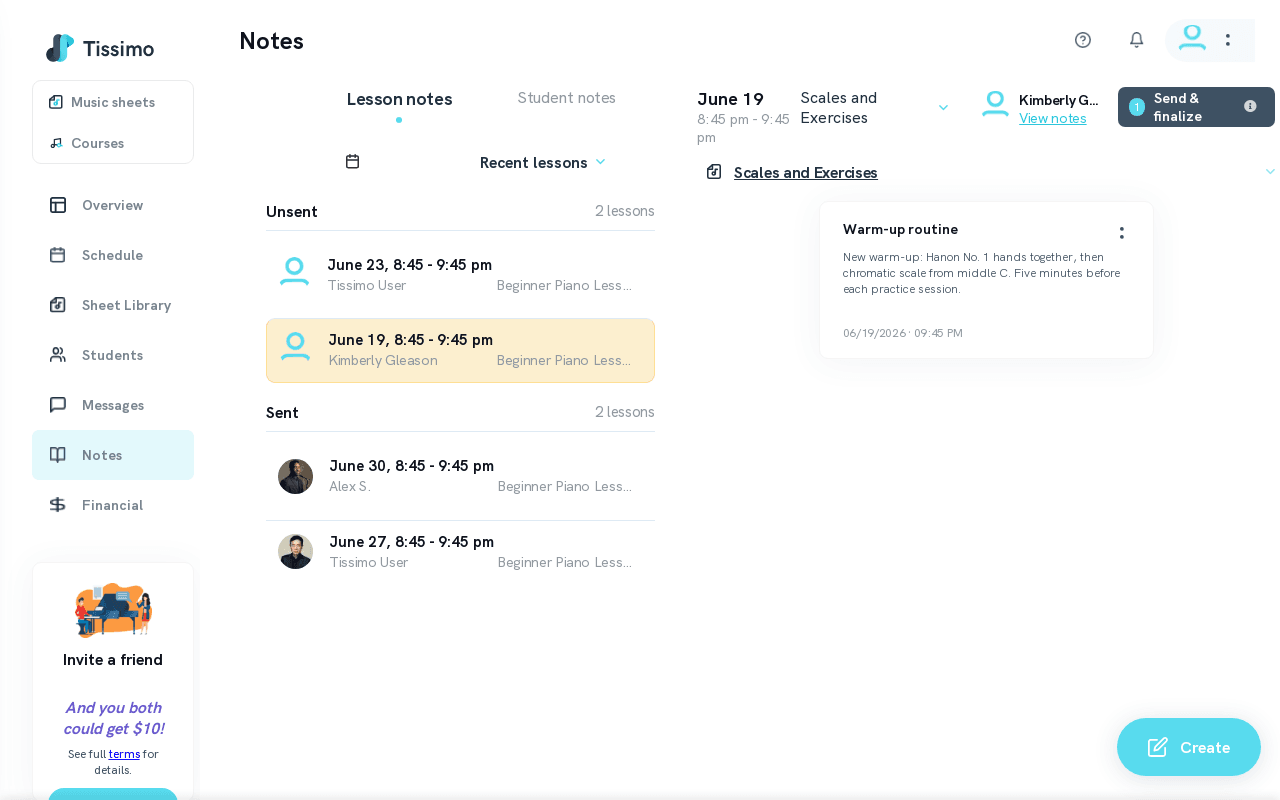
The Recent Lesson Notes view shows past lessons from the last 30 days of your teaching history, grouped into Unsent and Sent categories. Access it from the Lesson Notes section in your Teacher Dashboard, or navigate to the Notes hub to see all note types.
Unsent Notes
The Unsent section shows recent lessons for which notes have not yet been sent to the student. Work through it at the end of your teaching day to ensure every recent lesson has notes sent.
Sending rule: From the Notes page you can send Lesson Notes at any time; sending once the lesson has started finalises and locks them. In the classroom, the Send lesson notes button becomes available 5 minutes before the lesson end time.
Sent Notes
The Sent section displays recent lessons for which you have already created and delivered Lesson Notes. Use this section to recall what you assigned before the next lesson starts. For a searchable archive of what you sent, see View Sent Lesson Notes.
Tips for Music Teachers
- Check Recent Lesson Notes at the start of each teaching session to pick up where you left off.
- If you have back-to-back lessons, draft notes throughout the day and send them all at the end.
- Use Sort Student Notes to organise your student-level notes alongside lesson notes.
Related Articles
- Upcoming Lesson Notes — view and prepare notes for future lessons.
- Create Lesson Notes — write new notes for a lesson.
- Send Lesson Notes — send notes to the student.
- View Sent Lesson Notes — browse notes already delivered to students.
- Notes Calendar — browse lessons by date.

Comments