 Back
Back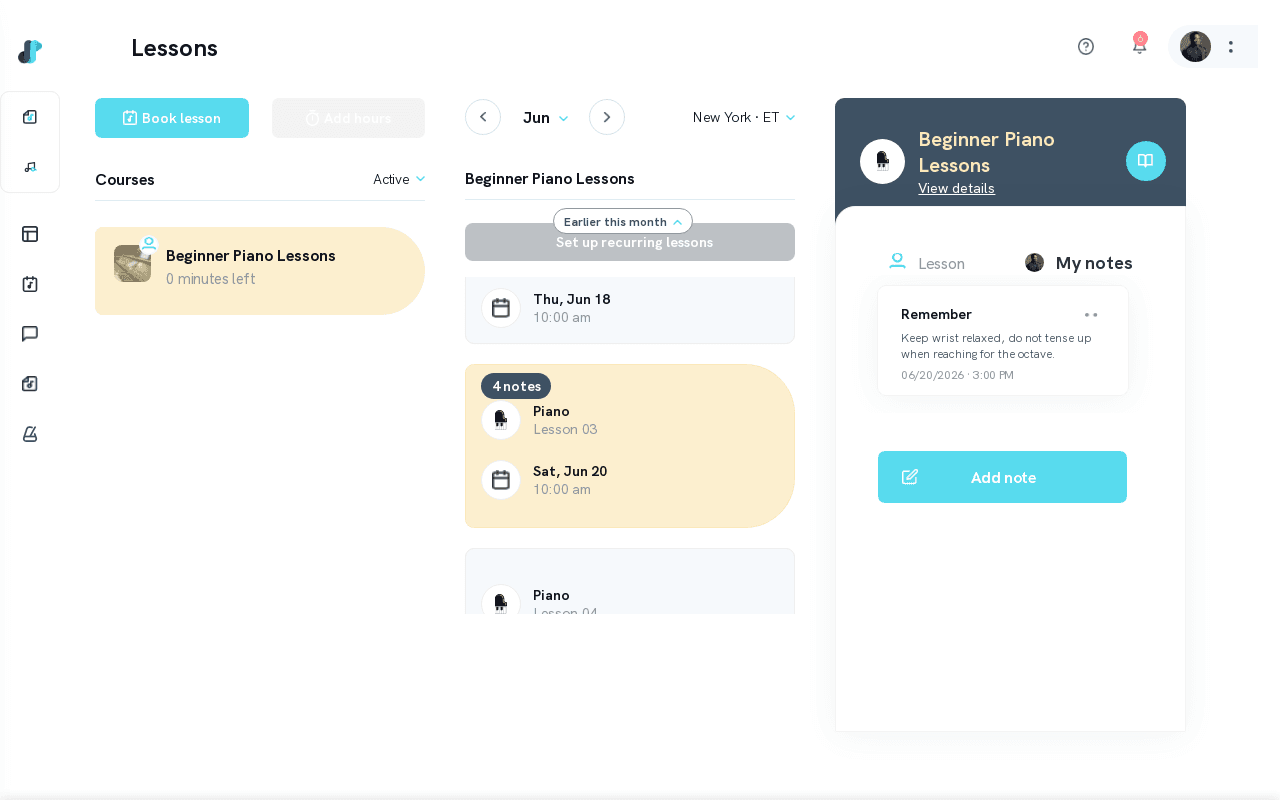
Accessing Your Lesson Notes as a Student
After a lesson, your teacher may share notes to help guide your practice. You can access these from your Tissimo account at any time.
How to Access Your Lesson Notes
From the Lessons Page
- Log in and go to your Lessons page.
- Click on any lesson card to open its detail panel.
- Click the Notes icon button at the top of the detail panel.
- The Notes panel opens with two tabs: Lesson (notes your teacher shared) and My notes (your own personal notes for this lesson).
During a Lesson
The same Notes panel is available inside the classroom while a lesson is in progress. Click the notes icon in the classroom to open it at any time.
Two Types of Notes
The Notes panel has two tabs:
- Lesson — Notes shared by your teacher. These are read-only and may include practice assignments, technique reminders, or resources.
- My notes — Your own private notes for this lesson. You can add, edit, and delete these whenever you like.
What Lesson Notes Typically Contain
Lesson notes vary by teacher and subject, but commonly include:
- Practice suggestions — specific exercises or pieces to work on before next time
- Technique tips — reminders about posture, hand position, breathing, or other technical focus areas
- Resources — links to sheet music, recordings, or reference videos
- Goals for the next lesson — what to aim for before you meet again
Notifications When Notes Are Added
When your teacher adds or updates notes for a lesson, you'll receive a notification — either through the Tissimo app or via email, depending on your notification preferences. You can adjust these preferences from your Notifications settings.
How Long Notes Are Stored
Lesson notes are stored indefinitely in your account. You can look back at notes from any lesson at any time — useful for tracking your progress, revisiting advice, or reviewing what you covered months ago. For more on your lesson history, see Student Lessons Page Overview. You can also use the Practice page to log sessions between lessons and track your progress.

Comments